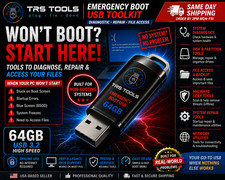
<h2>DiskPeak All-in-One Bootable USB Flash Drive (64GB - USB-A & USB-C)</h2>
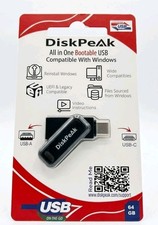
<p>Easily repair, restore, or reinstall Windows on your desktop or laptop with the <strong>DiskPeak All-in-One Bootable USB Drive</strong>! Featuring dual <strong>USB-A and USB-C connectors</strong>, this convenient tool is compatible with both modern laptops and legacy computers without needing adapters.</p>
<hr>
<h3>🌟 Key Features & Benefits:</h3>
<ul>
<li><strong>Dual Interface Versatility:</strong> Equipped with both <strong>USB-A</strong> and <strong>USB-C</strong> connectors for seamless compatibility across new and older PCs/Macs.</li>
<li><strong>UEFI & Legacy Compatible:</strong> Supports modern UEFI boot systems as well as classic Legacy BIOS modes.</li>
<li><strong>High Capacity Storage:</strong> <strong>64GB</strong> flash drive provides ample space for installation files, recovery tools, and system diagnostics.</li>
<li><strong>Video Instructions & Support:</strong> Includes QR code access to step-by-step video guides and detailed online tutorials at diskpeak.com/support.</li>
<li><strong>Essential Tech Tool:</strong> Ideal for fixing boot errors, removing crashes, reinstalling Windows, or performing system upgrades.</li>
</ul>
<hr>
<h3>🚀 Quick Start Guide:</h3>
<ol>
<li>Insert the USB drive into your PC and restart the device.</li>
<li>Press the BIOS menu key (e.g., F2, DEL) during boot. Disable <strong>Secure Boot</strong> and save changes.</li>
<li>Restart and press the Boot Menu key (e.g., F12, ESC).</li>
<li>Select the DiskPeak USB drive to boot into the menu.</li>
</ol>
<hr>
<h3>📦 Specifications:</h3>
<ul>
DiskPeak</li>
64 GB</li>
USB Type-A / USB Type-C</li>
198168490495</li>
Brand New, Factory Sealed Retail Packaging</li>
</ul>