 When you click on links to various merchants on this site and make a purchase, this can result in this site earning a commission. Affiliate programs and affiliations include, but are not limited to, the eBay Partner Network. When you click on links to various merchants on this site and make a purchase, this can result in this site earning a commission. Affiliate programs and affiliations include, but are not limited to, the eBay Partner Network.
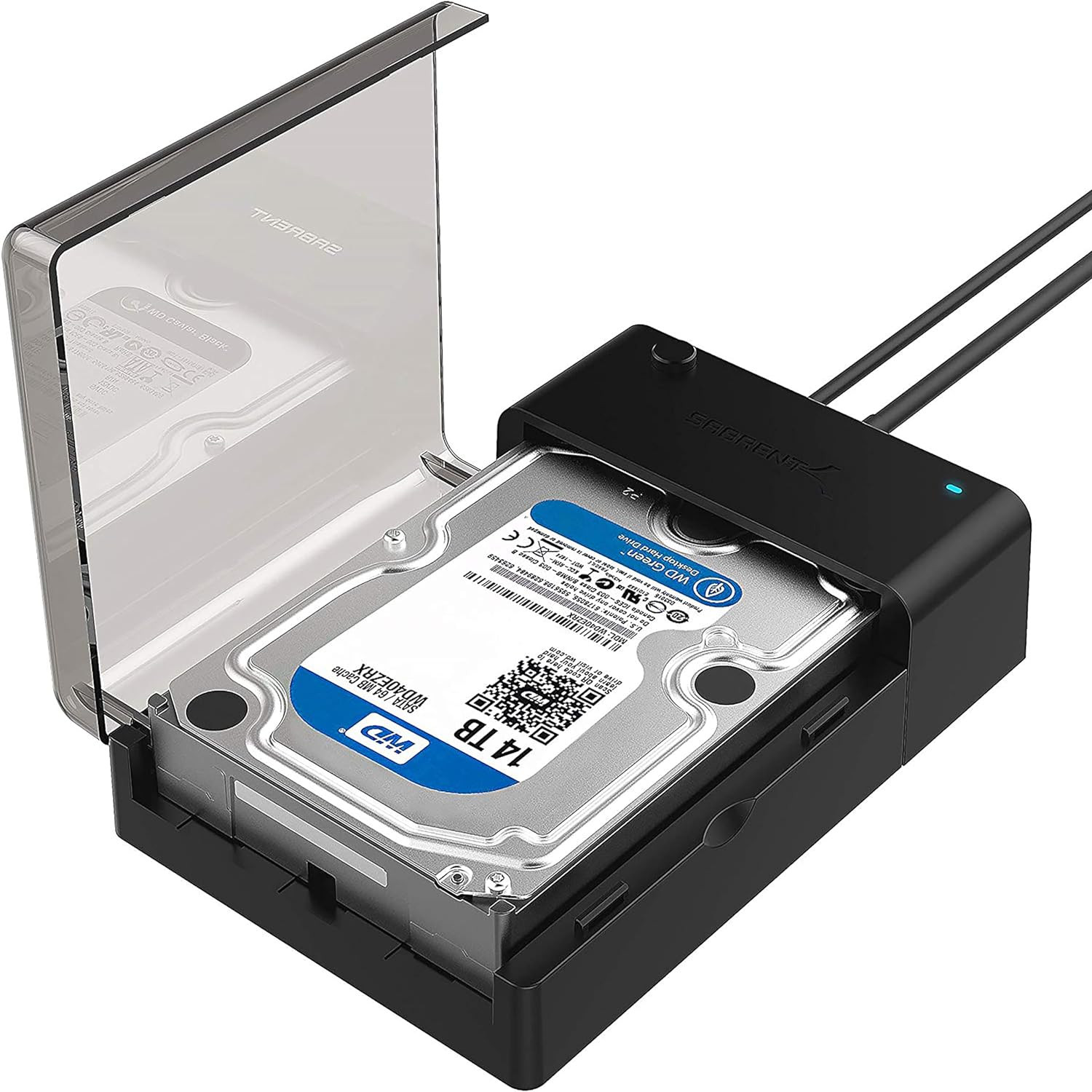
Product description The SABRENT EC DFLT SATA Lay Flat Docking Station supports the direct insertion of Desktop 2.5"/3.5" SATA Hard Drives. It is a caseless solution that makes swapping hard drives easier than ever before. Plus, now you can take advantage of the lightening speed of USB 3.0 to quickly transfer files up to 5 Gbps! Features: - Supports Standard Desktop 2.5"/3.5" SATA Hard Drives. .
- On/Off power switch.
- LED light indicates Power and Activity status.
- Hot swappable, plug and play, no drivers needed.
- Reverse compatible with USB 1.1 & USB 2.0.
- Transfer Rates Up to 5 Gbps w/USB 3.0
- Transfer Rates Up to 480 Mbps w/USB 2.0
System requirements: - Available USB 3.0 for high speed data transfer
- Reverse compatible with USB 1.1 & USB 2.0.
- Windows 10 / 11 (32-bit and 64-bit), macOS (current versions), Linux
- Package Contents:
- SABRENT EC DFLT Lay Flat Docking
- Power Supply
- USB 3.0 cable
- User Manual
Add to Cart Add to Cart Add to Cart Add to Cart Add to Cart Add to Cart Customer Reviews 4.6 out of 5 stars 77,314 4.6 out of 5 stars 77,314 4.5 out of 5 stars 6,050 4.4 out of 5 stars 37,064 4.4 out of 5 stars 3,072 4.3 out of 5 stars 8,639 Price $11.99$11.99 $11.99$11.99 $11.99$11.99 $29.95$29.95 $28.99$28.99 $31.95$31.95 Model # EC-UASP EC-OCUB EC-UK30 EC-DFLT EC-KSL3 EC-DFFN Size Compatibility: 2.5" SSD 2.5" SSD 2.5" SSD 2.5 & 3.5 SSD 2.5 & 3.5 SSD 2.5 & 3.5 SSD Capacity Supported: 8TB 8TB 8TB 20TB 20TB 20TB Transfer Speed: Up to 5 Gbps Up to 5 Gbps Up to 5 Gbps Up to 5 Gbps Up to 625 MB/s Up to 5 Gbps Cable: USB 3.0 Type-A USB 3.0 Type-B to Type-A USB 3.0 Type-A USB 3.0 Type-A USB 3.0 Type-B to Type-A USB 3.0 Type-A UASP: ✓ ✓ ✓ ✓ ✓ ✓ Plug and Play: ✓ ✓ ✓ ✓ ✓ ✓ Material: ABS ABS Aluminum ABS Aluminum ABS Assembly: Tool Free Tool Free Screws set with screws driver included Tool Free Tool Free Tool Free Fan Cooling: -- -- -- -- -- ✓ Frequently Asked Questions - Q: What types of drives are compatible with this docking station? A: This docking station supports standard 2.5-inch and 3.5-inch SATA I/II/III hard disk drives (HDDs) and solid-state drives (SSDs). Non-SATA drives are not supported.
- Q: What is the maximum drive capacity supported? A: This dock supports SATA drives up to 22TB, provided your operating system also supports large-capacity volumes. Drives over 2TB typically require GPT partitioning.
- Q: My 3.5-inch drive is not spinning up. What should I check? A: The included 12V/2A power adapter is required for operating 3.5-inch hard drives. Ensure the adapter is connected, the dock is switched on, and the LED power indicator is lit.
- Q: The drive is connected but does not appear on my computer. A: Check that the drive is fully inserted and powered. New drives may need to be initialized in your system’s disk management utility. Drives from encrypted enclosures or using self-encryption may require reformatting.
- Q: Is any software included for cloning or backups? A: A free download of Acronis True Image for Sabrent is available for data backup and cloning tasks. Please visit sabrent.com to download and activate the software.
- Q: What operating systems are compatible? A: This dock is compatible with Windows (7 and newer), macOS, and Linux. No driver installation is required for supported operating systems.
- Q: What is included in the package? A: The box includes the docking station, a USB 3.0 cable, a 12V/2A power adapter, and a user manual. Please contact Sabrent support if anything is missing or if further assistance is needed.
- SATA Drives Only — 2.5" & 3.5": Compatible with SATA I/II/III HDDs and SSDs. NOT compatible with IDE/PATA, M.2 NVMe, M.2 SATA, SAS, or USB-connected drives. Some high-capacity enterprise drives may have limitations — verify compatibility before purchasing.
- USB 3.0 (Type-A) — Connect Directly to a USB 3.0 Port: Host cable is USB Type-A (included). For stable operation, plug directly into a USB 3.0 port on your computer. USB hubs and USB 2.0 ports may cause intermittent disconnections. Typical HDD transfer speeds: 100–160 MB/s; SSD speeds vary.
- UASP (USB Attached SCSI Protocol) support for even faster performance. UASP requires UASP capable host system
- Plug & Play — Windows 10/11, macOS, Linux: No drivers required. Hot-swappable with LED activity indicator. UASP support for faster transfers (UASP-capable host required). Note: S.M.A.R.T. diagnostics are not supported through the USB bridge. Drive not included.
- 12V Power Adapter Required for 3.5" Drives: Includes AC power adapter (wall outlet required). 3.5" HDDs cannot be powered by USB alone — connecting without the power adapter will cause the drive to fail to spin up or disconnect during use. 2.5" drives are generally bus-powered but the adapter is recommended for stability.
 |
|