Product description
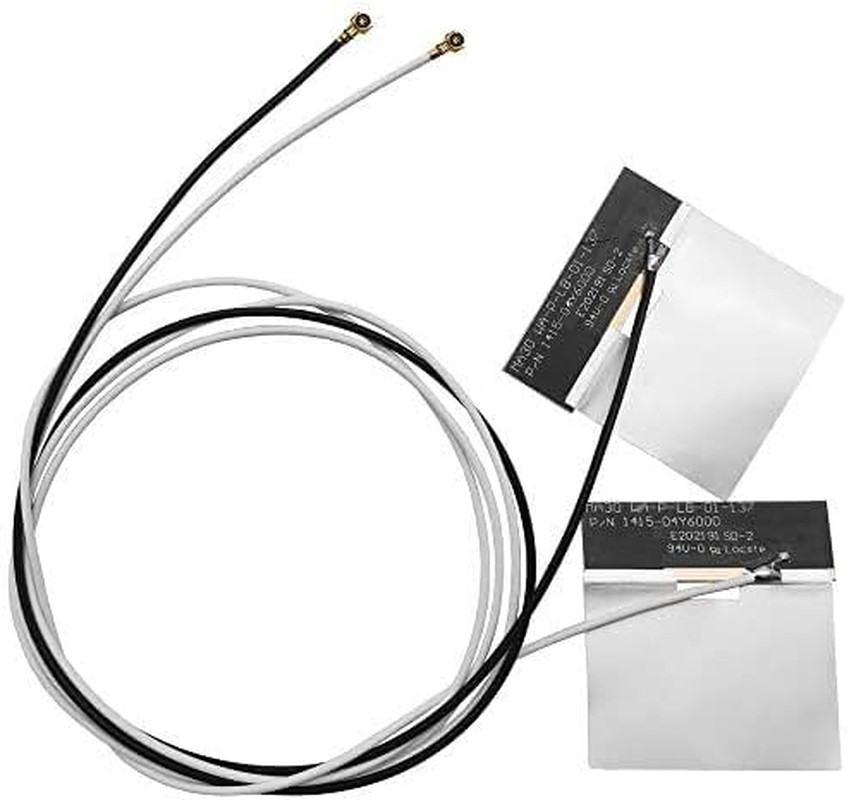
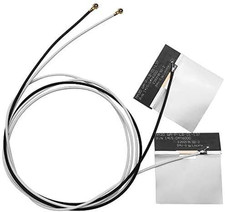
Is your laptop or mini PC ready for the next generation of wireless connectivity? This Tri-Band MHF4 Internal FPC Antenna Kit brings full 2.4GHz, 5GHz, and 6GHz support to your M.2 WiFi 6E/7 card. Unlike traditional dual-band antennas, this tri-band design unlocks the 6GHz "fast lane" for ultra-low latency, interference-free WiFi 6E/7 performance .
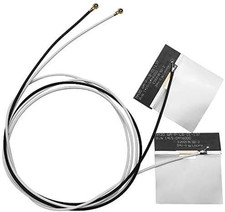
Designed specifically for M.2 (NGFF) interface WiFi cards, these antennas feature the industry-standard MHF4 (IPEX 4) connector with a 1.2mm mating height . The compact FPC (Flexible Printed Circuit) design with 3M adhesive backing allows for easy internal installation in laptops, mini PCs, and compact devices .
Chipset Series Models
for Intel WiFi 6E/7 AX210, AX211, AX200, AX201, 9560, 9260
for Intel 8xxx Series 8260, 8265
for Intel 7xxx Series 7260, 7265, 3160, 3165, 3168
for Killer 16xx/15xx1675x, 1650x, 1550, 1435, 1525, 1535
for Broadcom NGFF BCM94352Z, BCM94360HMB, BCM943228ZH
for Dell DW Series DW1560, DW1830, DW1820A
Technical Specifications Frequency Bands 2.4GHz (2400-2500 MHz), 5GHz (4900-5850 MHz), 6GHz (5925-7125 MHz) Gain 3 dBi Connector Type MHF4 (IPEX 4 / Gen 4) Radiation Pattern Omnidirectional (360° coverage) VSWR ≤ 1.8 (2.4GHz), ≤ 1.5 (6GHz) Impedance 50 Ohms PCB Size Approx. 2 x 0.35 inches Cable Length (Gray) 48 cm (18.8 inches) Cable Length (Black) 66 cm (25.9 inches) Operating Temp -40°C to +85°C Interface M.2 (NGFF) ONLY – NOT Mini PCIe Installation Guide(IMPORTANT: The MHF4 connector is delicate. Please read these instructions carefully.)
Step 1: Power Off Your Device – Turn off your laptop or mini PC and disconnect the power adapter.
Step 2: Access the M.2 Card – Remove the bottom cover of your laptop or open your mini PC to access the M.2 WiFi card.
Step 3: Remove Old Antennas – Gently disconnect the old antenna cables from the M.2 card by lifting the connector housing straight up with tweezers – never pull by the wire.
Step 4: Connect New Antennas – Align the MHF4 connector straight (90°) over the terminal on your M.2 card. Press straight down with light, even pressure until you feel a slight CLICK .
Step 5: Route and Secure – Route the cables inside your device chassis. Peel the adhesive backing and secure the FPC antennas to a non-conductive surface away from metal components
Step 6: Reassemble and Test – Close your device, power it on, and test your WiFi connection.
CRITICAL SAFETY WARNING: Never connect or disconnect an antenna with the device powered on. Operating a wireless card without an antenna can permanently damage the radio amplifier.
CHECK YOUR CARD BEFORE ORDERING
Visual: A three-panel infographic:
- Panel 1 (Compatible): M.2 (NGFF) card with U.FL/MHF4 port – “M.2 NGFF Card – COMPATIBLE”
- Panel 2 (NOT Compatible): Mini PCIe card – “Mini PCIe Card – NOT COMPATIBLE”
- Panel 3 (NOT Compatible): Older IPEX 1/2/3 connector – “Older IPEX 1/2/3 – NOT COMPATIBLE”
Text: This antenna uses the MHF4 (IPEX 4) connector. It is designed for M.2 (NGFF) interface cards ONLY . It will NOT work with Mini PCIe cards or older IPEX 1/2/3 connectors .
Title: Why the 6GHz Band is a Game-Changer
Text: Traditional WiFi networks (2.4GHz and 5GHz) are often congested with legacy devices, smart home gadgets, and neighboring networks. The 6GHz band provides exclusive, interference-free spectrum for next-generation WiFi 6E/7 devices.
Title: Compatible with Major WiFi 6E/6/5 M.2 Cards
WiFi Cards (M.2 NGFF with MHF4 Connector):
- for Intel AX210 / AX211 / AX200 / AX201 – WiFi 6E/6
- for Intel 9560 / 9260 / 8260 / 8265
- for Intel 7260 / 7265 / 3160 / 3165 / 3168
- for Killer 1675x / 1650x / 1550 / 1435 / 1525 / 1535
- for Broadcom BCM94352Z, BCM94360HMB, BCM943228ZH
- for Dell DW1560, DW1830, DW1820A
NOT Compatible:
- for Mini PCIe cards
- for Older IPEX 1/2/3 connectors
- for Intel 7265D2W, 8260D2W
HOW TO INSTALL YOUR MHF4 ANTENNA – READ BEFORE USE
Visual Layout: 4-panel infographic
StepAction
1Locate M.2 Card – Open your device and find the M.2 WiFi card. Identify the MHF4 ports.
2Remove Old Antennas – Gently lift the connector housing straight up with tweezers – never pull by the wire.
3Connect New Antennas – Align MHF4 connector straight (90°) over the terminal. Press straight down until you feel a CLICK .
4Secure and Route – Use 3M adhesive backing to place FPC antennas away from metal components .
Important Warnings:
- Do NOT insert at an angle – may damage the connector
- Do NOT pull by the wire – use tweezers on the connector housing
- Do NOT force the connector – if it doesn't click, check alignment
- Must be used with M.2 (NGFF) interface cards – NOT Mini PCIe
- 2x Tri-Band MHF4 (IPEX 4) Internal FPC Antennas (2.4/5/6GHz, 3dBi)
- 🔹 TRUE TRI-BAND COVERAGE – 2.4GHz / 5GHz / 6GHz WIFI 6E/7 READY – This internal FPC antenna supports all three frequency bands: 2.4GHz (2400-2500 MHz) for long-range coverage, 5GHz (5150-5850 MHz) for high-speed streaming, and 6GHz (5925-7125 MHz) for ultra-low latency WiFi 6E/7 performance. Frequency coverage: DC up to 7.125 GHz with low VSWR .
- 🔹 MHF4 (IPEX 4) PRECISION CONNECTOR – FOR M.2 NGFF CARDS – Features the industry-standard MHF4 (IPEX 4) connector (1.2mm mating height), specifically designed for modern M.2 (NGFF) WiFi cards . ⚠️ CRITICAL: This is for M.2 (NGFF) interface ONLY – NOT compatible with Mini PCIe cards or older IPEX 1/2/3 connectors. Compatible with Intel AX210, AX211, AX200, AX201, 9560, 9260, Killer 1675x/1650x/1550, and most M.2 NGFF WiFi cards .
- 🔹 FLEXIBLE PCB (FPC) ADHESIVE DESIGN – EASY INTERNAL INSTALLATION – The flexible printed circuit (FPC) antenna features a 3M adhesive backing for secure, permanent mounting inside RF-transparent (plastic) enclosures . The ultra-thin, flexible design fits easily inside laptops, mini PCs, and compact devices without taking up valuable space .
- 🔹 3DBI GAIN & OMNIDIRECTIONAL PERFORMANCE – Delivers 3 dBi gain with an omnidirectional radiation pattern for balanced 360° coverage . VSWR ≤ 1.8 for 2.4GHz band, ≤ 1.5 for 6GHz band ensures efficient power transfer and minimal signal reflection . Frequency range: 2400-7125 MHz .
- 🔹 DUAL CABLE LENGTHS – FLEXIBLE ROUTING – Includes two different cable lengths for flexible installation inside various chassis: Gray/White Cable: 56 cm (22 inches) Black Cable: 66 cm (25.9 inches) The adhesive backing allows for easy placement inside your device chassis.
- 🔹 WIDE COMPATIBILITY – SUPPORTS MAJOR WIFI 6E/7 CARDS – Compatible with M.2 (NGFF) interface cards including: Intel AX210, AX211, AX200, AX201, 9260, 9560, 8260, 8265, 7260, 7265 Killer 1675x, 1650x, 1550, 1435, 1525, 1535 Broadcom NGFF series, Dell DW series Most M.2 WiFi 6/6E/7 cards with MHF4 connector
- 🔹 ⚠️ CRITICAL INSTALLATION TIPS – The MHF4 connector is very delicate and must be handled with care : Align straight (90°) over the port – do NOT insert at an angle Press straight down with light, even pressure until you feel a slight click DO NOT wiggle or pull by the wire – use tweezers to lift the connector housing straight up if disconnecting IMPORTANT: This antenna is for M.2 (NGFF) interface ONLY – will NOT work with Mini PCIe cards
- 🔹 KIT INCLUDES – 2x Tri-Band MHF4 (IPEX 4) Internal FPC Antennas (1x Gray/White Cable, 1x Black Cable)