Kodak 4 in 1 Card Reader USB3.0 & Type C Universal Card Adapter Multifunctional adapter for SD Card & Micro sd Card,Kodak 4-in-1 USB 3.0 USB-C SD Micro SD Card Reader Dual Slot Adapter C210 for PC🌈 Product Description
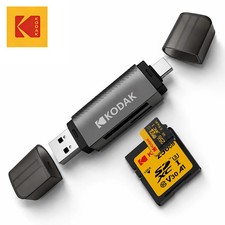
Transfer, organize, view, and back up your digital files quickly and conveniently with the Kodak C210 4-in-1 USB 3.0 and USB-C Memory Card Reader. 📸💻📱
Designed with both USB Type-A and USB Type-C connectors, this compact adapter connects to a wide variety of laptops, desktop computers, tablets, and compatible smartphones. The dual-interface design is especially convenient for users who regularly transfer files between traditional USB-A equipment and modern USB-C devices. 🔄⚡
The reader includes dedicated slots for full-size SD cards and microSD/TF cards. Both card slots can operate simultaneously, helping photographers, content creators, travelers, students, security-camera users, and everyday consumers manage files efficiently without repeatedly removing and reinserting cards. 🖼️🎥📁
With theoretical USB 3.0 transmission speeds of up to 5 Gbps, the Kodak C210 is suitable for transferring high-resolution photographs, videos, documents, music, backups, and other digital content. Actual performance depends on the memory card, connected device, operating system, file sizes, and USB port. 🚀💾
⭐ Key Features⚡ SuperSpeed USB 3.0 Data Transmission
Transfer photos, videos, documents, and other files with a theoretical interface speed of up to 5 Gbps. This makes the reader ideal for handling large photo collections, trail-camera recordings, dash-camera footage, surveillance files, and high-resolution video content. 📸🎬
📌 Important: Actual transfer speed is determined by several factors, including the memory card’s speed rating, the host device, the operating system, the USB port, and the size and number of files.
🔌 Dual USB-A and USB-C Connectors
The integrated dual-connector design allows the reader to work with both:
This eliminates the need to carry separate card readers for older and newer equipment. Simply use the connector that matches your compatible device. 💻📱
⚠️ USB-A and USB-C connectors must not be connected simultaneously.
💳 Simultaneous SD and MicroSD Card Access
The Kodak C210 can access a compatible SD card and microSD/TF card at the same time. This provides greater convenience when copying or organizing files between two memory cards. 🔄📂
Simultaneous card access can help reduce repeated card removal, improve workflow efficiency, and make file management more convenient for photographers and content creators. 📷✨
🧩 Plug-and-Play Operation
No complicated installation process is required. Connect the reader to a compatible device, insert your memory card, and access your files through the device’s standard file-management application. ✅
🛠️ No separate driver normally required
🔋 No additional external power supply required
💻 Simple external installation
📂 Convenient file access and management
🌍 Suitable for home, office, school, studio, and travel use
🛡️ Protective Connector Covers
Protective covers are included on both ends to help shield the USB connectors from dust, moisture splashes, scratches, and everyday contact while the reader is stored or transported. 🎒🛡️
💧 The covers provide everyday protection but do not make the product waterproof.
🎒 Compact and Travel-Friendly
The lightweight, portable design fits easily inside a laptop bag, camera case, backpack, organizer, purse, or pocket. It is a practical accessory for photographers, travelers, students, office workers, and mobile content creators. 🌎✈️📸
📋 Technical Specifications
🏷️ Brand: Kodak
🔢 Model Number: C210
🧩 Product Type: External multi-format memory card reader
🔌 Interfaces: USB Type-A and USB Type-C
⚡ USB Standard: USB 3.0
🚀 Maximum Theoretical Interface Speed: Up to 5 Gbps
💳 Card Slots: SD and microSD/TF dual-card slots
🔄 Simultaneous Card Access: Yes, compatible SD and microSD cards can be accessed together
🛠️ Installation Type: External, plug-and-play
🔋 External Power Required: No
📦 Quantity: 1 card reader per package
🧪 High-Concern Chemicals: None declared by the manufacturer
✅ Certification: UKCA
🌏 Country/Region of Origin: Mainland China
📦 Listed Package Dimensions: Approximately 5.91 × 5.91 × 0.39 in / 15 × 15 × 1 cm
⚖️ Listed Package Weight: Approximately 1.23 oz / 0.035 kg / 35 g
📏 Measurement Notice: The supplied 5.91 × 5.91 × 0.39 in / 15 × 15 × 1 cm dimensions and 1.23 oz / 35 g weight appear to refer to the packaged item. Minor measurement and packaging variations may occur.
💾 Supported Memory Card Formats
The reader is designed to support commonly used memory card formats, including:
💳 SD
💳 SDHC
💳 SDXC
💳 MMC
💳 RS-MMC
💳 microSD
💳 microSDHC
💳 microSDXC
💳 TF cards
🚦 UHS-II Card Information
UHS-II cards may be recognized; however, transfer performance is limited to approximately the UHS-I standard, depending on the card and connected equipment. It does not provide full UHS-II transfer speed. ⚠️
💻 Device Compatibility
The dual-interface design is suitable for many compatible devices equipped with USB-A or USB-C ports, including:
💻 Windows laptops and desktop computers
🍎 MacBook, iMac, and other compatible Mac computers
📱 USB-C smartphones with OTG support
📲 USB-C tablets with OTG or external-storage support
📷 Digital cameras through removable memory cards
🎥 Action-camera memory cards
🚘 Dash-camera memory cards
🦌 Trail-camera memory cards
🏠 Surveillance-camera memory cards
🎮 Other compatible USB-A or USB-C host devices
🍎 Compatible USB-C iPhone Models
Designed for use with compatible USB-C iPhone models, including the iPhone 15, 16, and 17 series, subject to the device’s software, file-system support, and external-accessory requirements. 📱
📌 Compatibility is not guaranteed with every device, memory card, operating-system version, protected file, or proprietary application.
🖥️ Operating-System Compatibility
No separate driver is normally required for supported systems, including:
🪟 Windows 11
🪟 Windows 10
🪟 Windows 8
🪟 Windows 7
🪟 Windows Vista
🍎 macOS / Mac OS X 10.2 or later
📱 iOS 13 or later on compatible support can vary depending on device hardware, system updates, security settings, USB permissions, and memory-card formatting. 🔐
📦 Package Includes✅ 1 × Kodak C210 4-in-1 USB 3.0 and USB-C Memory Card Reader
✅ Integrated protective connector covers
✅ Retail packaging, when supplied by the manufacturer
📌 Memory cards, smartphones, tablets, computers, cameras, cables, and other devices shown or referenced are not included unless specifically stated otherwise.
🎯 Where and How Can It Be Used?📸 Photography and VideographyInsert your camera’s SD or microSD card to transfer photographs and videos to a laptop, desktop computer, compatible tablet, or smartphone. It is a convenient solution for reviewing, editing, organizing, and backing up creative work. 🖼️🎞️
✈️ Travel and Outdoor AdventuresTransfer vacation photos, drone recordings, action-camera footage, or trail-camera files while traveling. Its compact design makes it easy to carry inside a camera bag or backpack. 🏕️🌄
🚘 Dash CamerasRemove the memory card from a compatible dash camera and use the reader to review, save, or share recorded footage on a supported computer or mobile device. 🚗🎥
🏠 Surveillance and Security CamerasAccess compatible surveillance-camera memory cards to review stored recordings, archive important clips, or move files to another storage location. 🔐📹
🎓 School and UniversityStudents can use the adapter to move presentations, assignments, photographs, videos, project files, and other compatible content between memory cards and computers. 📚💻
🏢 Office and Professional WorkTransfer documents, media files, presentations, scanned materials, and project data between compatible storage cards and workplace devices. 📊📁
📱 Mobile Content CreationCreators using USB-C smartphones or tablets can import supported photographs and videos for editing, publishing, or backup—provided the mobile device supports OTG and external memory-card access. 🎨📲
🛠️ How to Use🔌 Select the appropriate connector: USB-A or USB-C.
💻 Connect the reader to a compatible computer, tablet, or smartphone.
💳 Insert the SD card or microSD/TF card into the correct slot.
⏳ Wait for the connected device to recognize the card.
📂 Open File Explorer, Finder, Files, or the appropriate file-management application.
🔄 View, copy, move, organize, or back up the desired files.
✅ Allow all active transfers to finish completely.
⏏️ Use the operating system’s safe-eject function before disconnecting the card or reader.
⚠️ Never remove a memory card or unplug the reader while data is being transferred. Doing so may interrupt the transfer or corrupt files.
🌟 Main Benefits🚀 Fast and efficient file transfers
🔌 Works with both USB-A and USB-C connections
💳 Supports full-size SD and microSD/TF cards
🔄 Reads two compatible cards simultaneously
🛠️ No separate driver normally required
🔋 No external power adapter required
🎒 Compact, lightweight, and easy to transport
📸 Excellent for photos and high-resolution video files
💻 Suitable for personal, educational, and professional use
🛡️ Protective covers help protect the connectors during storage
🌍 Broad compatibility with modern and legacy USB devices
⭐ Kodak-branded model for dependable everyday file management
⚠️ Important Compatibility Notes📱 OTG Is Required for Mobile DevicesUSB-C smartphones and tablets must support OTG functionality and external-storage access. A USB-C port alone does not automatically guarantee compatibility.
🔌 Use Only One Connector at a TimeDo not connect the USB-A and USB-C plugs simultaneously. Select only the connector that matches your host device.
📁 Android File-System RequirementsFor many Samsung, Google, and LG smartphones, the memory card should be formatted as:
Compatibility may vary by device model, Android version, manufacturer settings, memory-card capacity, and installed applications.
💾 Memory Card Not IncludedThis listing includes the card reader only. SD cards and microSD cards must be purchased separately unless the listing explicitly states otherwise.
⚡ Transfer-Speed NoticeThe advertised 5 Gbps figure represents the maximum theoretical bandwidth of the USB 3.0 interface. It is not a guaranteed file-transfer rate. Actual speed may be lower due to:
🗂️ Back Up Important FilesAlways maintain a separate backup of valuable photographs, videos, documents, and recordings. A card reader provides access to files but does not protect against memory-card failure, accidental deletion, formatting errors, or corrupted data.
🧼 Care and Maintenance🧹 Keep the connectors and card slots clean and free from dust.
💧 Do not expose the reader to water, heavy moisture, or corrosive liquids.
☀️ Avoid excessive heat, direct sunlight, and extreme temperatures.
🔧 Do not force a card into the wrong slot or insert it in the wrong direction.
🛡️ Replace the protective covers after use.
🎒 Store the reader in a dry, secure location when not in use.
⚡ Avoid unplugging the reader during active file transfers.
🧽 Use a soft, dry cloth for exterior cleaning.
🚫 Do not insert metal objects into the connectors or card slots.
👶 Keep the small adapter away from young children and pets.
🛍️ Why Buy This Kodak Card Reader?The Kodak C210 combines practical connectivity, fast data handling, dual-card access, and portability in one compact accessory. 🌟
Unlike single-connector readers, it offers both USB-A and USB-C connectivity, making it easier to work with different generations of computers and mobile devices. Its ability to access both SD and microSD cards simultaneously can simplify file transfers and reduce repeated plugging and unplugging. 🔄💻📱
It is an excellent choice for:
🔑 Key Bullet Points📸 Kodak C210 4-in-1 memory card reader
⚡ USB 3.0 interface with theoretical speeds up to 5 Gbps
🔌 Integrated USB-A and USB-C connectors
💳 Supports SD, SDHC, SDXC, MMC, RS-MMC, microSD, microSDHC, microSDXC, and TF
🔄 Reads compatible SD and microSD cards simultaneously
🧩 Plug-and-play operation on supported devices
🔋 No additional power supply required
🛡️ Protective covers on both connector ends
🎒 Compact and portable for everyday travel
💻 Compatible with many Windows, macOS, iOS, Android, USB-A, and USB-C devices
📱 OTG support required for compatible smartphones and tablets
🚦 UHS-II cards supported at up to UHS-I-level transfer performance
📦 One Kodak C210 card reader included
✅ UKCA certified
📢 Final Purchase NoticeBefore ordering, please verify that your device has a compatible USB-A or USB-C port, supports external memory-card access, and—when using a smartphone or tablet—supports OTG functionality. Please also confirm that your memory card format and capacity are supported by your connected device and operating system. 🔍✅
Product appearance, packaging, labels, and minor design details may vary slightly due to manufacturing updates, production batches, screen settings, and lighting conditions. Specifications are based on the information supplied for the Kodak C210 model. 🌈📦