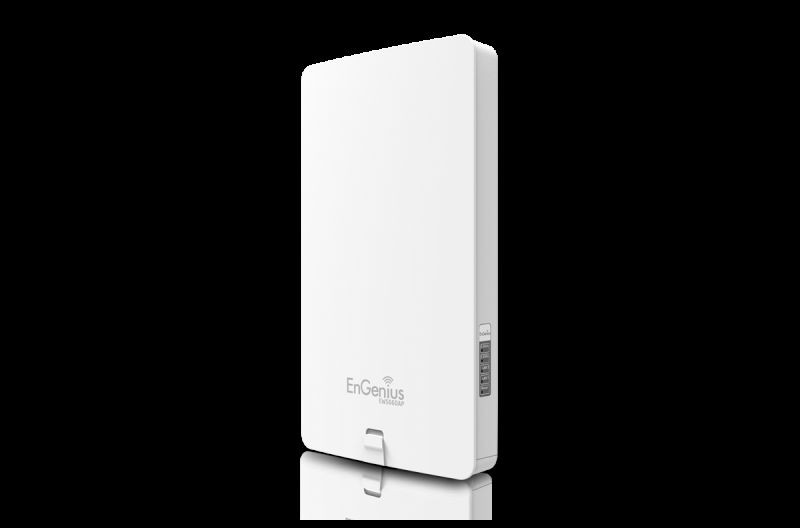
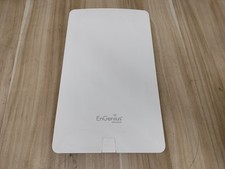
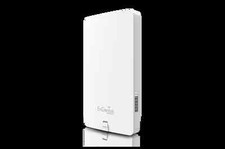
Neutron Series Dual Band Wireless AC1750 Managed Outdoor Access Point
The EWS660AP is a high-powered, long-range, 3x3 Dual Band Neutron Series Managed Wireless solution AC1750 802.11a/b/g/n/ac Outdoor Access Point that functions as a stand-alone Access Point or as part of an EnGenius Neutron Series Wireless Management solution. It features a high transmit RF power for better outdoor signal penetration.
The EWS660AP can operate as a stand-alone Access Point connecting to third-party PoE-capable switches but more control and versatile management of the Access Point is achievable when it is part of an EnGenius Neutron Series Wireless Network Management solution because the AP includes firmware that enables it to be immediately discovered, configured, m
EWS660APNeutron Series Dual Band Wireless AC1750 Managed Outdoor Access Point
Technical Specifications
Hardware
RF: 2.4 and 5 GHz Frequency Bands
Standard: IEEE 802.11a/b/g/n and ac (draft)
Radio I: 11b/g/n: 2.412~2.484 GHz
Radio II: 11a/n/ac: 5.18-5.24 and 5.26-5.32 and 5.5-5.7 and 5.745-5.825 GHz
Data Rate: Up to 450 Mbps in 2.4 GHz; up to 1300 Mbps in 5 GHz
Memory: 128MB
Flash Memory: 16MB
Antenna Array
Internal High Gain Antenna Array supporting both2.4 GHz and5 GHz
Physical Interface
1 x RJ-45 Gigabit Ethernet (10/100/1000 Mbps) - PoE Capable 802.3at
1 x Reset Button
1 x Power Connector
LED Indicators
Power
WPS
WLAN (Wireless Connection)
LAN
Power Requirements
Power Supply: 100 to 240V DC +/-10% 50/60 Hz
Active Ethernet (Power-over-Ethernet IEEE 802.3at)
DC IN, 12V/2AModulations
OFDM: BPSK, QPSK, 26-OAM, 64-QAM, DBPSK, DQPSK, CCKOperating Channels
2.4 GHz: US/Canada 1-11
5 GHz: Country dependent for the following ranges:
36, 40, 44, 48, 52, 56, 60, 64, 100, 104, 108, 112, 116, 120, 124, 128, 132, 136, 140, 149, 153, 157, 161, 165
Management
Multiple BSSID
Supports up to 8 BSSIDs per radio
LAN
IP (check validity and DHCP server IP range) MACSSID-to-VLAN Tagging
Supports 802.1q SSID-to-VLAN taggingSpanning Tree
Supports 802.1d Spanning Tree Protocol
Wireless
Wireless Mode: 11a/11b/11g/11n
Channel selection (settings vary by country)
Channel bandwidth (Auto, 20 MHz, 40 MHz)
Transmission Rate
2.4 GHz: 11n only, 11b/b/n mix, 11b only, 11b/g, 11g only
5 GHz: 11n only, 11a/n mix, 11a only
QoS
WMM (Wireless Multimedia)
Wireless Management Features (with Neutron Series Switch)
Access Point Auto Discovery and Provisioning
Access Point Auto IP Assignment
Access Point Cluster Management
Remote Access Point Rebooting
Access Point Device Name Editing
Access Point Radio Settings
Band Steering
Traffic Shaping
Fast Handover
Fast Roaming
Access Point Client Limiting
Wireless Security (WEP, WPA/WPA2 Enterprise, WPA/WPA2 PSK)
VLANs for Access Point- Multiple SSIDs
Guest Network
Access Point Status Monitoring
Wireless Client Monitoring
Wireless Traffic & Usage Statistics
Real-time Throughput Monitoring
Visual Topology View
Floor Plan View
Map View
Secure Control Messaging
SSL Certificate
Local MAC Address Database
Remote MAC Address Database (RADIUS)
Unified Configuration Import / Export
Bulk Firmware Upgrade Capability
Intelligent Diagnostics
Management (cont.)
Tx Power Control
Adjust transmit power by dBmConfiguration
Web-based configuration (http)Firmware Upgrade
Via web browser, settings are reserved after upgradeAdministrator Settings
Administrator Username and Password ChangeReset Settings
Reboot (press and hold for 2 seconds).
Reset to factory default (press and hold for 10 seconds)System Monitoring
Status Statistic and Event LogSNMP
V1, V2c, V3MIB
MIB I, MIB II (RFC1213) and private MIBTraffic Shaping
Incoming and outgoing wireless traffic shapingAuto-channel Selection
Automatically selecting least congested channelBandwidth Measurement
IP range and bandwidth managementAuto Reboot
Reboot Access Point by minute, hour, day, or weekBackup and Restore
Save and restore settings through Web interfaceCLI
Supports Command Line InterfaceDiagnosis
IP pinging statisticsLog
SysLog and Local Log supportLED Control
On/OffAP Detection
Scanning for available EnGenius APs
Security
WPA/WPA2 Personal (WPA-PSK using TKIP or AES)
WPA/WPA2 Enterprise (WPA-EAP using TKIP)
802.1X RADIUS Authenticator: MD5/TLS/TTLS, PEAP
SSID broadcast enable/disable
MAC Address Filtering, Up to 50 fields
Guest Network
L2 Isolation (Access Point mode)
QoS (Quality of Service)
WMM (Wireless Multimedia)
Environmental & Mechanical
Temperature Range
Operating: -4º~158ºF/-20ºC~70ºC
Storage: -22Fº~176ºF/-30ºC~80ºC
Humidity (non-condensing)
Operating: 90% or less
Storage: 90% or less
Waterproof
IP65-Rated Enclosure
Physical Security
Kensington Security Slot
Certifications
FCC, ICMaximum data rates are based on IEEE 802.11 standards. Actual throughput and range may vary depending on many factors including environmental conditions, distance between devices, radio interference in the operating environment, and mix of devices in the network. Features and specifications subject to change without notice. Trademarks and registered trademarks are the property of their respective owners. For United States of America: Copyright ©2014 EnGenius Technologies, Inc. All rights reserved.Dimensions & Weights
Package Contents
EWS660AP Dual Band AC1750 Outdoor Access Point
12V/2A Power Adapter
Pole Mounting Bracket
RJ-45 Ethernet Cable
Quick Installation GuideWarranty
1 Year