NOTE:- Instruction is NOT included.- The process can be difficult. We recommend person with professional knowledge or prior experience.- Please connect to test item before adhesion. We only accept return in original 100% brand new and high quality,2. Replace your broken, damaged, cracked, unusable LCD screen glass.3. Each screen is tested well before shipment.4. Make your phone looks new again.5. Compatible with iPad 8th 10.2 2020 A2270 A2428 A2429 A24306.Package includeing: ( Not with LCD )1 x Touch Screen + Home ButtonOR 2x Touch Screens +Home Button Best store
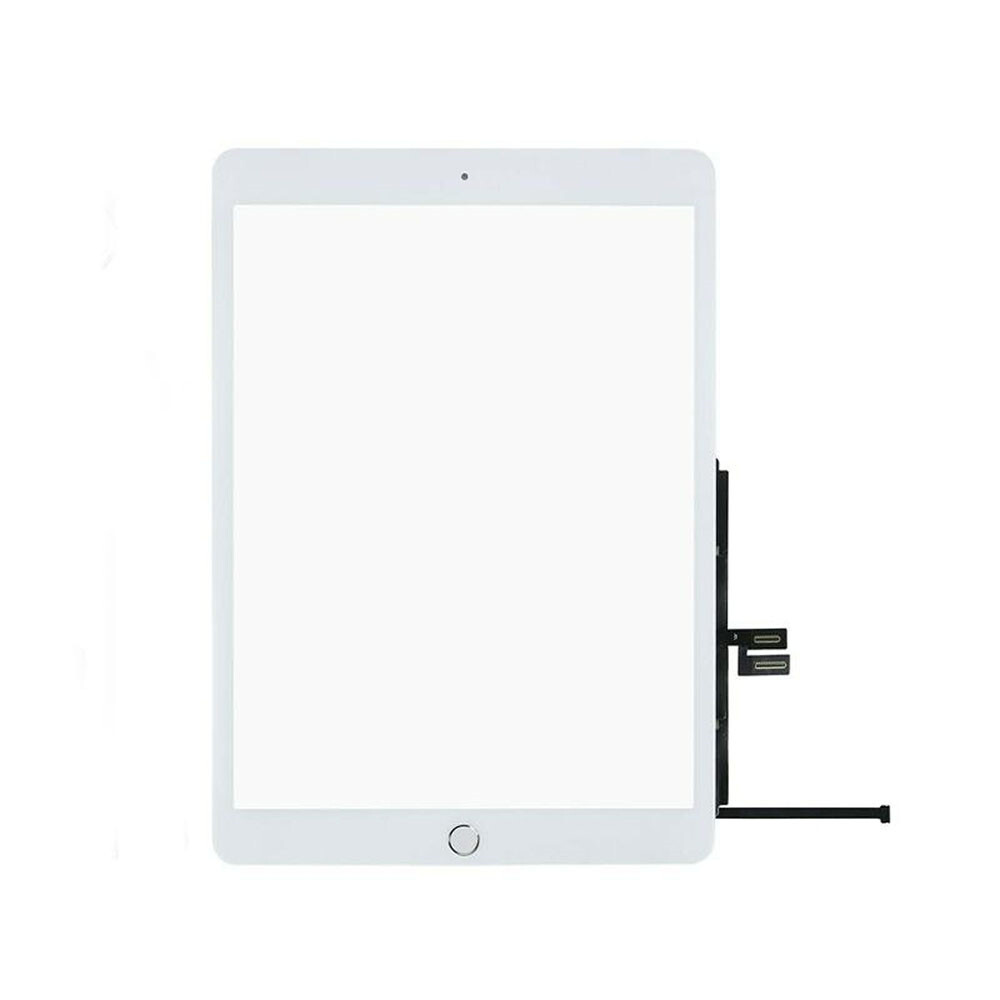
1/2PCS Touch Screen +Home Button For iPad 8th 10.2" 2020 A2270/A2428/A2429/A2430
NOTE:
- Instruction is NOT included.
- The process can be difficult. We recommend person with professional knowledge or prior experience.
- Please connect to test item before adhesion. We only accept return in original 100% brand new and high quality,
2. Replace your broken, damaged, cracked, unusable LCD screen glass.
3. Each screen is tested well before shipment.
4. Make your phone looks new again.
5. Compatible with iPad 8th 10.2 2020 A2270 A2428 A2429 A2430
6.Package includeing: ( Not with LCD )
1 x Touch Screen + Home Button
OR 2x Touch Screens +Home Button
Before Installation Notes:
1. Tips 1: Test before installation
When testing, do not remove any protective film or tags. Please pay attention to the problem of static electricity.
Before attempting any repair, be sure to ground yourself is an ESD (electro static discharge) strap. This will prevent static electricity from damaging the electronic components within the phone.
Ensure you wear eye protection and use caution not to cut your finger with the glass splinters.
2. Tips 2: Simulates testing
Screen replacement is very fragile product. We strongly suggest test before installation. Please simulates testing, which means mobile phone apart, (motherboard + LCD or screen) connected audio cable and new replacement, power on, test finished. If test OK, please install it. If it can not show, please contact us at the very first time. And please do not force it to be installed in mobile phone.
3. Tips 3: Do not over-bend cable
Please make sure LCD cable Do not over-bend. Over 90 degrees bent will cause black display.
Item SpecificsBrand UnbrandedCompatible Screen Size 10.2 inCompatible Model For Apple iPad (8th Generation)Compatible Brand For AppleCompatible Product Line For iPad 8th Generation
Return Policy Restocking fee: There will be a 15% restocking fee if returning mistakenly order or no longer needed item, read the tips below on how to avoid it.
- Read the item description carefully instead of only the listing title;
- Choose the correct item from the drop-down menu (if applicable) before clicking on the add to cart button;
- If you have any questions regarding the item, please send us a message before purchasing.
Installation Fee: All LCD in original condition may be returned within (30) days from the purchase date for a full refund without installation. We highly recommend to our customers to test the LCD and make sure it is fully functioning before installation since the components on the LCD is fragile and can easily be damaged by static electricity or other factors that causes image or touch issues. Depending on the used condition of the LCD, it may be Disqualified for a return or charging a 15% installation Fee.DOA (Dead On Arrival): Take a picture of the outer box if you have received a damaged package, check all the contents inside for any physical damage and send the pictures to us as evidence within 3 Days for a return or refund.LCD Testing Instruction 1.Wear Anti-Static Gloves or a Wrist Strap to release any static electricity before touching the LCD.2.Check the pins on the flex cable connector to see if any of them is bent or missing.3.Check around the LCD and make sure none of the components are damaged.4.Check the light reflection on the LCD under a lamp to see if any of the areas have a different color.5.Connect the LCD and Digitizer/Touch flex cables to your device's motherboard connectors first.
- *DO NOT install the LCD onto the device BEFORE testing the parts !
6.Move an icon around on your screen to make sure the display and touch are fully functional.Payment We only accept payment via PayPal.Please make your payment within 5 days after sale ends otherwise a non-payment dispute will be opened. Before purchasing, please make sure that your address is correct.Shipping After receiving your payment, your order will be shipped within 1-2 business days from California via usps.Free shipping is provided in our store.We are not responsible for anything late or lost by USPS.Contact Us We are honest and responsible seller.Customer satisfaction is very important to us and our response rating reflects this satisfaction.If you have any questions, Our customer service staffs welcome feel free to contact us by message box. We strive to answer all questions and resolve any problems as quickly as possible.If your item has any issues, Do NOT leave a Negative response without contacting us through first, we will try our best to get it resolved and provide an address for you to return the item once it is qualified. Returns will be processed within (7) business day after receiving the item.
Best store
Shop CategoryStore Home For Samsung Digitizer For iPhone Digitizer For OnePlus Digitizer For Motorola Digitizer For Google Digitizer Other Digitizer For Samsung Tablet For Apple Tablet Other Tablet Accessories For iPhone Case Memory RAM Stylus Z Wholesale W Wholesale X Wholesale OtherHot Item Gorilla Heavy Duty Cover Shockproof Metal Case For iPhone 16 15 14 13 12 Pro Max USD 14.87 Metal Case For iPhone 15 14 13 12 16 Pro Max Gorilla Heavy Duty Cover Shockproof USD 14.89 LCD Display Digitizer For Samsung Galaxy A13 LTE 4G A135 A135F Touch screen Tool USD 17.59 LCD Display Touch Screen Replacement Assembly For iPad Air 2 iPad A1566 A1567 USD 77.26 For Motorola Moto G Stylus 2020 XT2043-4 LCD Digitizer Touch Screen Replacement USD 20.39 New List Item For iPad Pro 11 A1980 A2013 A1934 LCD Display Touch Screen Digitizer Assembly USD 140.90 For iphone XS A1920 A2097 A2098 A2100 Replacement LCD Display Touch Screen Tool USD 19.55 For iPad 7/8th 10.2"Touch Screen Glass A2197 A2198 A2200 A2270 A2428 A2429 Black USD 13.98 Replacement LCD Display Touch Screen For iPhone 6S Plus A1634 A1687 A1699 Black USD 17.79 For Nintendo Switch Lite LCD Display + Glass Touch Screen Digitizer Replacement USD 50.99 Help & InfoPayment PolicyShipping PolicyReturn PolicyFAQAbout Us 1/2PCS Touch Screen +Home Button For iPad 8th 10.2" 2020 A2270/A2428/A2429/A2430
NOTE:
- Instruction is NOT included.
- The process can be difficult. We recommend person with professional knowledge or prior experience.
- Please connect to test item before adhesion. We only accept return in original 100% brand new and high quality,
2. Replace your broken, damaged, cracked, unusable LCD screen glass.
3. Each screen is tested well before shipment.
4. Make your phone looks new again.
5. Compatible with iPad 8th 10.2 2020 A2270 A2428 A2429 A2430
6.Package includeing: ( Not with LCD )
1 x Touch Screen + Home Button
OR 2x Touch Screens +Home Button
Before Installation Notes:
1. Tips 1: Test before installation
When testing, do not remove any protective film or tags. Please pay attention to the problem of static electricity.
Before attempting any repair, be sure to ground yourself is an ESD (electro static discharge) strap. This will prevent static electricity from damaging the electronic components within the phone.
Ensure you wear eye protection and use caution not to cut your finger with the glass splinters.
2. Tips 2: Simulates testing
Screen replacement is very fragile product. We strongly suggest test before installation. Please simulates testing, which means mobile phone apart, (motherboard + LCD or screen) connected audio cable and new replacement, power on, test finished. If test OK, please install it. If it can not show, please contact us at the very first time. And please do not force it to be installed in mobile phone.
3. Tips 3: Do not over-bend cable
Please make sure LCD cable Do not over-bend. Over 90 degrees bent will cause black display.
Return Policy Restocking fee: There will be a 15% restocking fee if returning mistakenly order or no longer needed item, read the tips below on how to avoid it.
- Read the item description carefully instead of only the listing title;
- Choose the correct item from the drop-down menu (if applicable) before clicking on the add to cart button;
- If you have any questions regarding the item, please send us a message before purchasing.
Installation Fee: All LCD in original condition may be returned within (30) days from the purchase date for a full refund without installation. We highly recommend to our customers to test the LCD and make sure it is fully functioning before installation since the components on the LCD is fragile and can easily be damaged by static electricity or other factors that causes image or touch issues. Depending on the used condition of the LCD, it may be Disqualified for a return or charging a 15% installation Fee.DOA (Dead On Arrival): Take a picture of the outer box if you have received a damaged package, check all the contents inside for any physical damage and send the pictures to us as evidence within 3 Days for a return or refund. LCD Testing Instruction 1.Wear Anti-Static Gloves or a Wrist Strap to release any static electricity before touching the LCD.2.Check the pins on the flex cable connector to see if any of them is bent or missing.3.Check around the LCD and make sure none of the components are damaged.4.Check the light reflection on the LCD under a lamp to see if any of the areas have a different color.5.Connect the LCD and Digitizer/Touch flex cables to your device's motherboard connectors first.
- *DO NOT install the LCD onto the device BEFORE testing the parts !
6.Move an icon around on your screen to make sure the display and touch are fully functional. Payment We only accept payment via PayPal.Please make your payment within 5 days after sale ends otherwise a non-payment dispute will be opened. Before purchasing, please make sure that your address is correct. Shipping After receiving your payment, your order will be shipped within 1-2 business days from California via usps.Free shipping is provided in our store.We are not responsible for anything late or lost by USPS. Contact Us We are honest and responsible seller.Customer satisfaction is very important to us and our response rating reflects this satisfaction.If you have any questions, Our customer service staffs welcome feel free to contact us by message box. We strive to answer all questions and resolve any problems as quickly as possible.If your item has any issues, Do NOT leave a Negative response without contacting us through first, we will try our best to get it resolved and provide an address for you to return the item once it is qualified. Returns will be processed within (7) business day after receiving the item.
All rights reserved.