This comes from a genuine HP Z2 G9 Tower, works perfectly and ships to you immediately.
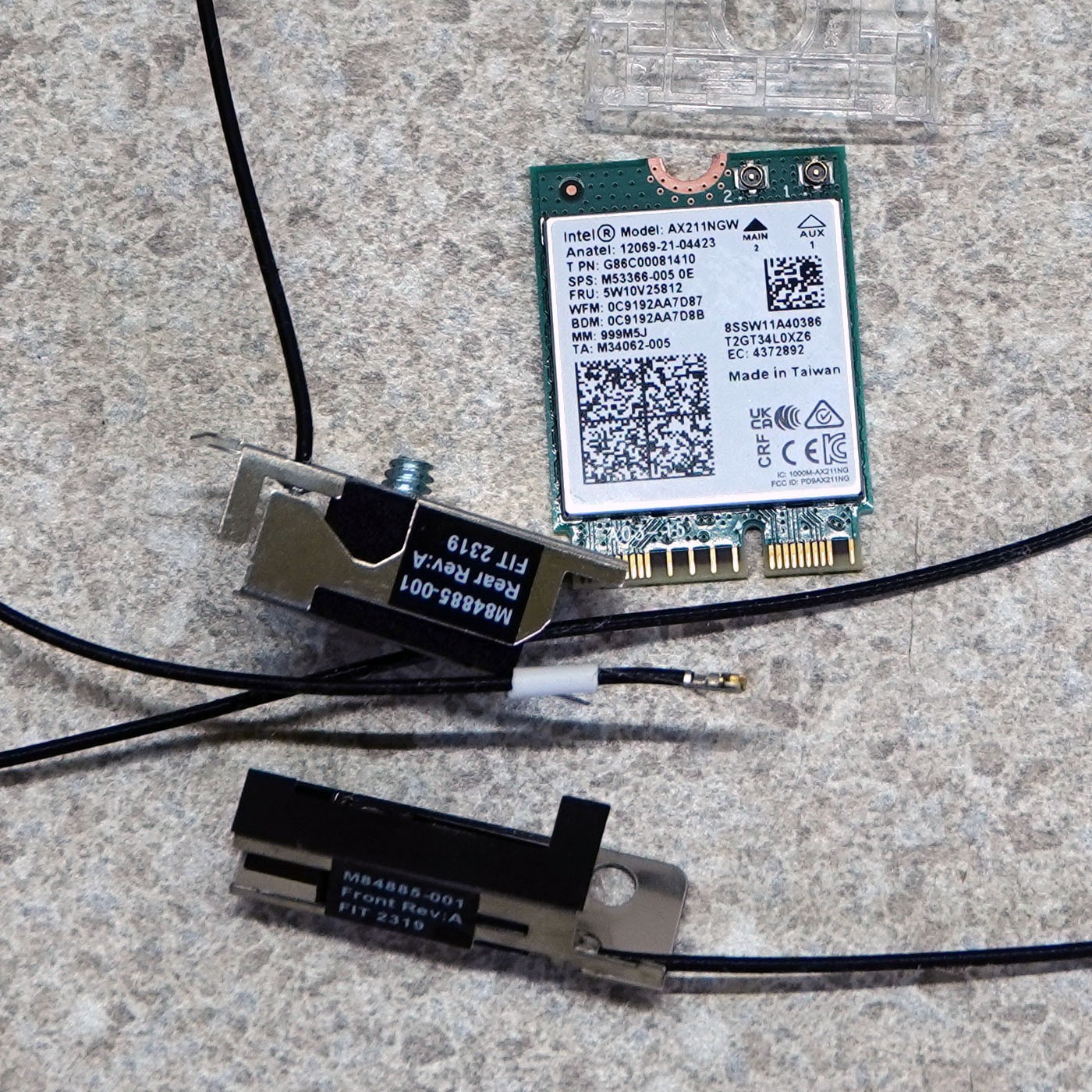
My first three pics show you the exact parts that this kit includes - an Intel AX211NGW WiFi/BT card w mounting screw, the front antenna w mounting screw and the rear antenna w mounting screw and protective/aesthetic cover.
To install most things in any HP machine, I would normally suggest that HP's free-to-download .pdf file would be your go-to resource, and that manual does give nicely illustrated details for handling the actual Intel card, but it completely ignores where the antennas are intended, which is what my last four picture try to be helpful with. And I can tell you very clearly that you do NOT need to pull your motherboard to install this - just the top lid, the front cover and the drive cage.
...for the rear antenna, you'll be pushing the antenna wire in from the back, then screw it in place and attach the cover. The front wire gets pushed in similarly, but then you tunnel it under the motherboard until it pokes out near where the card gets attached to the motherboard - but screw the front antenna in place first, in case you didn't get it quite right. The HP manual plus my pics should make you a pro on your first try.
The hard part is attaching the antenna fittings to the card! - they're tiny and can be easily damaged!! What I do is to attach the wires, then put the little, clear plastic lock in place BEFORE plugging it in, then screwing it to the motherboard.
...and do write me if you have further questions, please.